A clinic, a camp, and a weekly class are three different things

Most schedulers treat every group session as an appointment with extra people in it. Elite Coach Booking treats a program as inventory. Pick the shape, set the seats, and the program publishes itself to your website with its own page.

A pickleball coach running a Tuesday clinic series and a weekend camp

The clinic repeats every Tuesday for four weeks and each date should be bookable on its own. The camp runs Saturday through Monday and should sell once for the whole block. Those are two different products, and rebuilding either one by hand every week is how coaches quietly stop running them.

  • The weekly clinic publishes one page carrying all four dates, each with its own seat count.
  • The camp publishes one page where a single registration covers all three days.
  • Both land on the same programs page of the coach's site, ready to send to a parent.
app.elitecoachbooking.com · Programs
Coach app

Kitchen Confidence Clinic

One program record holding the schedule pattern, the seat count, the venue, and the page it publishes.

Shape Weekly class Four Tuesdays, each bookable on its own
Seats 4 per date Hillcrest Park
Price $35 per attendee Full pay, deposit, or free
Publishing writes to
Your programs page Its own program page

Set it up once, and the page is already written

Captured from the coach app and from live Elite Coach Booking demo coaching sites. The coaches are demo tenants, because a real program belongs to a real coach's roster.

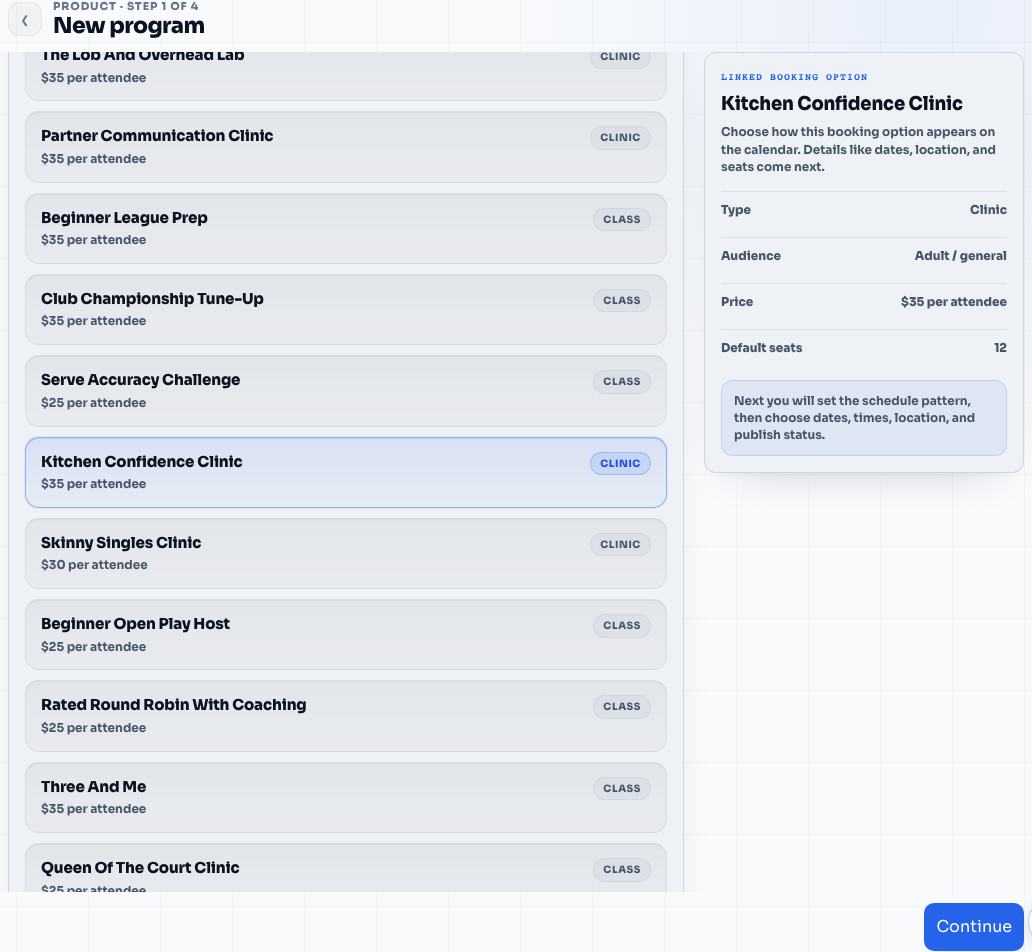
The new program wizard in the coach app, listing pickleball clinics and classes with their type and price per attendee.
Step one. Pick what you are running. Each option already carries its type, its audience, its price per attendee, and its default seat count.
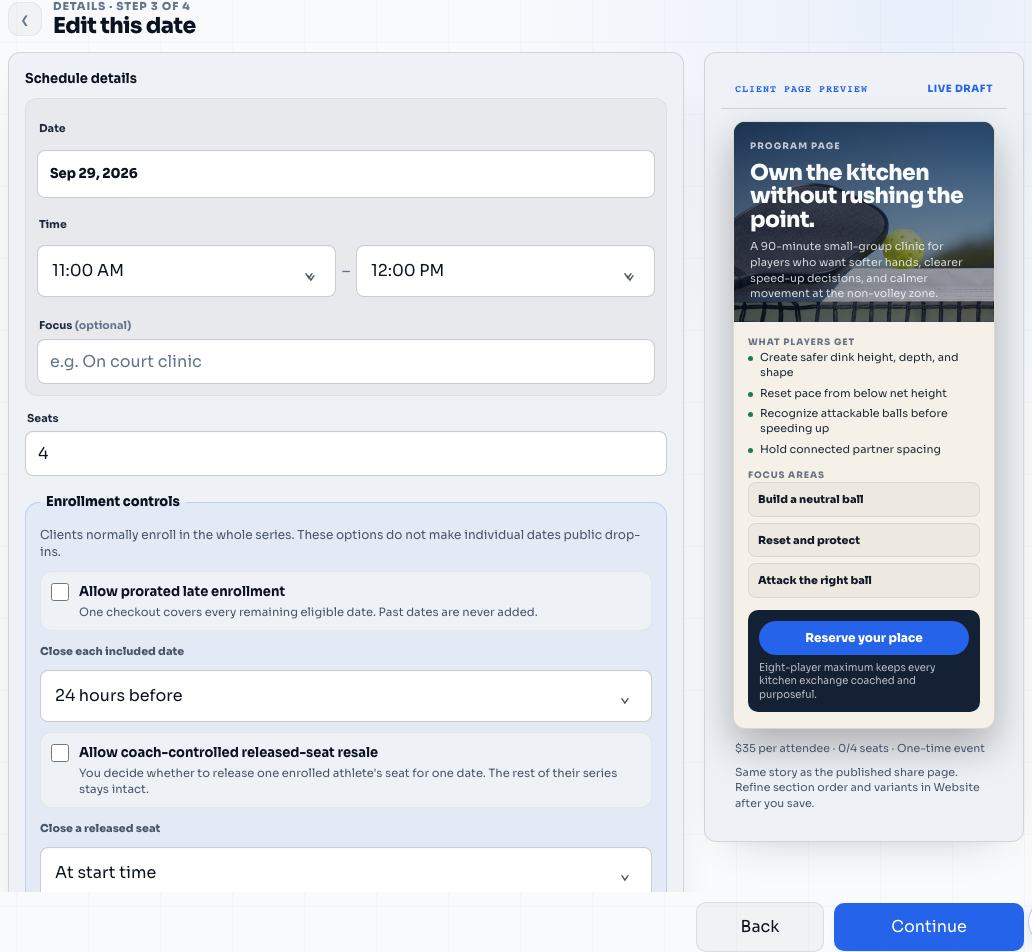
The program details step showing date, time, seats, venue, and a live preview of the client facing program page.
Step three. Date, time, seats, and venue on the left. The client page you are about to publish is already drawing itself on the right.
The programs storefront on a published pickleball coaching site, showing a featured clinic and further programs with dates, venue, seats left, and price.
Publishing puts the program on your site's programs page, with the next start date, the venue, the seats left, and the price already filled in.
A published weekly clinic page listing four Tuesday dates, each with its own location, seats left, and book this date button.
A weekly clinic publishes one page that carries every date. Players book the Tuesday they can make, and each date keeps its own seat count.
A published baseball camp page showing Saturday, Sunday, and Monday sessions grouped under a single registration button.
A multi day camp publishes one page too, but the three days sit under one registration, because a camp is a block and not three drop ins.
The same programs storefront on a phone, with the heading, the description, and the featured clinic card stacked.
The page you text a parent. Most program links get opened on a phone, so the storefront and every program page are built for that first.

A private lesson is one person and one time. A program is a product. It has a promise, a start date, a seat count, a price, a place, and usually a parent deciding whether it is worth the Saturday. Generic schedulers only model the time, which is why coaches end up rebuilding clinics by hand, tracking seats in their heads, and answering the same three questions by text.

Elite Coach Booking models the rest of it.

Three shapes, because coaches run three things

A one time clinic. A single date, a seat count, and a page. Publish it, send the link, and stop when it fills.

A multi day camp. Consecutive days sold as one block. One registration covers Saturday, Sunday, and Monday, because a camp is not three drop in sessions that happen to be next to each other.

A recurring class or clinic series. Same day, same time, week after week. Each date is separately bookable, so a player who can only make two Tuesdays can take two Tuesdays. If your program runs on more than one day a week and should sell as a single signup, that is a weekly package.

Recurring programs publish their dates inside the booking horizon you set, from one week out to twelve. The page shows the next real dates rather than a calendar stretching into next year, and new dates roll forward as the old ones pass.

The page is part of the product

Publishing a program does two things at once. It adds the program to the programs page on your coaching website, which is a storefront players can browse, and it generates a landing page for that one program.

That landing page is not a title and a time. It holds a hero and a headline, who the program is for, what players get, the focus areas or curriculum blocks, a proof quote, your policies, the questions parents ask, a coach section, and a booking call to action. You can reorder those sections, choose an editorial or campaign layout, and lead with the schedule, the story, or the proof depending on what actually sells that program.

Every dated program page carries the things that decide a registration: the next start, the location, the seats left, the price per attendee, and a button that opens the real booking flow. When a program has a description and at least one session, its page joins your site’s sitemap, so a clinic can be found and not just forwarded.

Starting from a blank page is why programs do not get run

The Program Template Library exists for the gap between deciding to run a clinic and having something worth publishing. It is sixty coach ready programs, ten each for pickleball, tennis, golf, soccer, baseball, and softball, and each one arrives as a complete draft: the headline, the offer story, what players get, the focus areas, the policies, the questions, and matched photography.

Applying a template does not publish anything. It creates one private draft, and you still set the price, the schedule, the venue, and the seat count before anything goes live. Change as much of the copy as you want first. The point is that the blank page is gone.

The library is a separate Core add on at $29 a month, and it is included free for life with a White-Glove Launch in those six sports. Coaches in other sports build programs the same way, just without the prewritten starting point. See what the White-Glove Launch includes.

After people register

The roster lives on the program. You can see who is enrolled, how many seats are left, who has paid, and who still owes. You can add someone manually when a parent catches you on court, and check players in on the day. A multi day camp checks in day by day, so day two attendance is a real number rather than a memory.

Payment follows the same rules as the rest of your business. Charge in full, take a deposit and collect the balance before or at the session, or run a program for free when it is a taster. Deposits, refunds, and cancellations stay attached to the registration. See payments for how the money side works.

If you have to cancel a date, the app walks you through who is affected and what to do about their payment instead of leaving you to reconstruct it. When a program ends, you can see what it earned, how full it ran, and how many people showed up.

What gets easier

  • A clinic goes from an idea to a link you can text in one sitting.
  • Seats, price, venue, and audience live on the program, not in your head.
  • The same clinic next month starts from the last one.
  • Parents get a page that answers their questions before they message you.
  • Group work and private lessons share one calendar, one client list, and one payout.

Why coaches care

Programs are the highest leverage hour a coach sells. Eight players in one clinic is not eight times the admin unless the software makes it that way. If setting one up takes an evening, and filling it takes a week of texts, most coaches quietly go back to private lessons.

This is the part of the system that makes running group coaching feel worth it. If you mostly run clinics and camps, start with clinics and camps, or read how coaches run recurring clinics without rebuilding rosters.
Six decisions, and the program is live on your website.

01

Pick what you are running

Choose a clinic, class, or camp you already sell, or create a new one. It carries its own name, its price per attendee, and whether it is for adults or juniors.

02

Choose the shape

One time for a single day or a fixed multi day camp. Weekly for a class that repeats on the same day and time. Weekly package when one signup covers more than one day a week.

03

Set the dates and the seats

Pick the dates and times, then set how many seats each one holds. Recurring programs run until a date you choose, for a number of sessions you choose, or until you stop them.

04

Attach the venue

Choose a saved venue or type a custom address. The location travels to the program page, the confirmation, and the reminder, so nobody has to ask where it is.

05

Write the page

Give the program a headline, who it is for, what players get, the focus areas, the policies, and the questions parents actually ask. A live preview shows the page as you write it.

06

Publish

The program appears on your site's programs page, gets its own landing page you can send to anyone, and holds the time on your calendar so nothing double books.

Programs stop being a rebuild

A weekly clinic is one setup, not a new event every Sunday night. Running the same camp next season starts from the last one instead of a blank page.

The offer gets room to sell

A program page has space for the promise, the schedule, the focus areas, the policies, and the coach. A calendar link has a title and a time.

Seats stay honest

The public page shows how many seats are left and closes the date when it fills, so you are not counting registrations in a text thread.

One place after the whistle

The roster, who has paid, and who checked in stay attached to the program, including day by day for a multi day camp.

Bring the messy coaching rules.

Elite Coach Booking turns those rules into a booking flow clients can use and a coach app you can run from.